Posts

Module 6. Securing Email Communication

Image
    SECURING EMAIL COMMUNICATION EMAIL Used to communicate electronically by sending messages from one computer to another via the Internet SPAMS AND FILTERING Spam refers to unsolicited commercial emails ; filtering helps discard or redirect unwanted messages USER CONSIDERATIONS Users choose email clients based on these considerations: security, privacy, visual appeal reliability, availability, and ease of use DIGITAL SIGNATURE AND ENCRYPTION Digital signatures verify  authenticity , while encryption  secures  messages from unauthorized access SECURITY THREATS Several threats in Email Communication are: malicious email attachments, malicious user redirection, phishing, hoax mail, and spam SYMMETRIC & ASYMMETRIC ENCRYPTION Symmetric encryption uses a single key, while asymmetric encryption uses a public-private key pair PHISHING AND HOAX EMAIL Phishing tricks users into revealing sensitive data , while hoax emails are forged to compromise security HASH FU...

Module 12. Secure Remote Work

Image
   SECURE REMOTE WORK DEFINITION Remote work is a flexible working lifestyle that is provided to users by their organization. It enables them to work outside of the office environment. ADVANTAGES It saves time and money for both companies and the end user in various sectors. It can increase productivity with reduced distractions. It provides the worker the opportunity to set up a working environment of their choice. It provides workers with greater opportunities by not placing restrictions on location. RISKS Insecure Wi-Fi Network Physical Security Issues Insecure Passwords Unencrypted File Sharing Phishing Attacks Insecure Security Controls Infrastructure Security Attacks Insider Risks MITIGATIONS Always check phishing emails and sites Use VPN when Necessary Avoid using public network Ensure the meeting secured and private Update OS and Apps periodically Do not download and install from unknown sites / links Prevent social engineering attacks by avoiding suspicious links a...

Module 11. Securing IoT Devices And Gaming Consoles

Image
   Securing IoT Devices And Gaming Consoles DEFINITION 1. IoT :  Network of multiple devices connected through the Internet to gather or share data about their use and environment 2. Gaming Console :  Specialized computers used for playing video games by connecting to a display such as a TV and to a game controller. RISKS 1. IoT:  Exposure Data Gathering Tracking Wifi Breaching Interception Data Exposure 2. Gaming Consoles: Spoofed Websites DDoS Attack Keylogger Identity Theft Malware SECURING 1. IoT:  Prevent unauthorized pairing Two Factor Authentication Strong password Update periodically Utilizing safety features 2. Gaming Consoles: Securing Network Strong password Two Factor Authentication Utilize robust string password MORE INFORMATION Smart home systems perform actions such as sensing, automating, and controlling to analyze and describe a situation based on the data gathered till that point in time to perform an action or make a decision. Gaming cons...

Module 10. Data backup & Disaster recovery

Image
  DATA BACKUP & DISASTER RECOVERY DEFINITION Backup involves the creation of duplicate copies of important data and its storage on media storage devices such as CD/DVD, USB, external hard disks, Internet servers, cloud, etc. Data backup should be a priority in computer maintenance along with virus protection, as it is easy and inexpensive to back up data in comparison to recovering it after a disaster or system crash. NEEDS FOR BACKUP A data backup is like car insurance, it helps reduce damage if something goes wrong. Just as insurance protects against car theft or accidents, backups protect against data loss. Data loss is more common than expected and can result from accidental deletion, corruption, system crashes, theft, natural disasters, or malicious attacks. ADVANTAGES It ensures at least one copy of data survives accidents or natural disasters. It's cost-effective since the cloud provider handles hardware purchase and maintenance. Setup and installation are simple. Da...

Module 7. Securing Mobile Devices

Image
   SECURING MOBILE DEVICES DEFINITION Mobile security refers to securing data on mobile devices such as smartphones and tablets. IMEI The International Mobile Equipment Identity (IMEI) number is used to identify a device that uses cellular networks. RISKS Mobile device security risks include eavesdropping, unmanaged applications, theft and loss, mobile devices not limiting Internet connections, and unauthorized access. MALWARE Mobile malware is malicious software that is specifically built to target mobile phones and smartphones systems. Mobile malware steals confidential data, racks up long-distance phone charges, and collects user data. VULNERABILITIES Mobile application vulnerabilities include insecure data storage, broken cryptography, insufficient transport layer protection, and poor authorization and authentication. Threats to Bluetooth devices include Bluesnarfing, man-in-the-middle attack, and backdoor hacking. SOLUTION & PREVENTION Regularly updating mobile OS fix...

Module 8. Securing The Cloud

Image
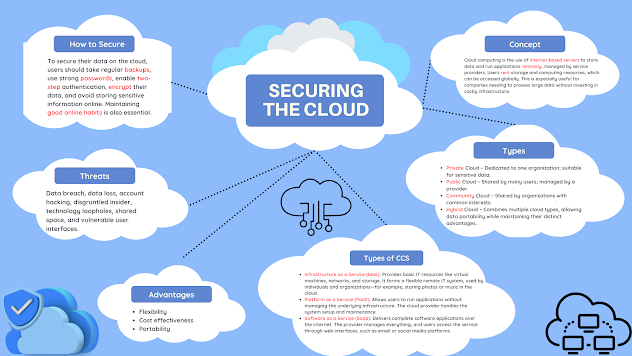
   Securing The Cloud CONCEPT Cloud computing is the use of  internet-based servers  to store data and run applications  remotely , managed by service providers. Users  rent  storage and computing resources, which can be accessed globally. This is especially useful for companies needing to process large data without investing in costly infrastructure. TYPES Private  Cloud – Dedicated to one organization; suitable for sensitive data. Public  Cloud – Shared by many users; managed by a provider. Community  Cloud – Shared by organizations with common interests. Hybrid   Cloud – Combines multiple cloud types, allowing data portability while maintaining their distinct advantages. TYPES OF CCS Infrastructure as a Service (IaaS) : Provides basic IT resources like virtual machines, networks, and storage. It forms a flexible remote IT system, used by individuals and organizations—for example, storing photos or music in the cloud. Platform as ...

Module 9. Securing Network Connection

Image
   Securing Network Connection DEFINITION A network is defined as a group of computers and other devices connected with each other to exchange data TYPES Local Area Network (LAN):  A network within a limited area (e.g., office or school) that connects computers and devices to share data and resources like printers and storage. Wide Area Network (WAN):  A large-scale network that connects multiple LANs across different geographical areas, allowing communication between distant users and systems. Virtual Private Network (VPN):  A secure, private connection between computers or networks over the internet, using tunneling to create a temporary, encrypted communication channel. Ethernet:  When users plug in a cable into their computers to connect to the Internet, this method of Internet connection. Home Networking: Process of interconnecting all devices in a home together and with the Internet in general; these devices include computers, laptops, mobile phones, ...